
When you pick a relay for your project, you should look at some important common design parameters. These help make solid state relays safe and work well. These common design parameters assist you in choosing the right relay and preventing problems from occurring. The most important ones are current capacity, thermal management, and the type of semiconductor device.
| Design Parameter | Description |
|---|---|
| Current Capacity | Can handle bigger loads without failing |
| Thermal Management | Stops the relay from getting too hot |
| Semiconductor Device | Helps decide how well it works and how much current it can take |
Many industries, like car makers and hospitals, need to pick these common design parameters carefully. You make relays work better and safer when you choose the right parameters for your job. Picking a relay means matching these common design parameters to what you need.
Key Takeaways
-
Always check the current and voltage ratings of your relay. Choose a relay with a current rating at least 20% higher than your load to prevent failures.
-
Understand the type of load you are using. Match your relay to either AC or DC loads for safe and effective operation.
-
Add safety margins when selecting a relay. This means choosing a relay with higher ratings than your load to protect against surges.
-
Consider thermal management. Use heat sinks for relays handling more than 4 amps to keep them cool and functioning well.
-
Look for certifications like UL and CE. These ensure your relay meets safety standards and helps protect your system.
Load Needs in Solid State Relays
Current and Voltage Ratings
You should always check the current and voltage ratings first. If you pick a relay with a lower current rating, it can break. Too much current makes the relay get hot and stop working. If the voltage rating is too low, the relay can get damaged. This can also make your load stop working. Pick a relay with a current rating higher than your load. For voltage, choose a relay with a rating at least 50% more than your load. This helps protect the relay from surges and keeps it safe.
Here is a table that shows common current and voltage ratings for solid state relays used in factories:
| Type | Voltage Range | Current Rating |
|---|---|---|
| AC SSR | 24-480V AC | Up to 40A |
| DC SSR | 3-100V DC | Up to 40A |
If you use devices that need a lot of current, check the surge current. Surge current happens when you turn on the load. If the relay cannot handle the surge, it might break. Always look for the surge current rating in the datasheet.
Tip: For loads with high inrush or surge, pick a relay with a higher surge current rating.
Load Type: AC or DC
You need to know if your load uses AC or DC. AC loads need relays that can do zero-cross switching. DC loads need relays that switch right away. The table below shows the main differences:
| Feature | AC Loads | DC Loads |
|---|---|---|
| Control Voltage Range | 24 VAC to 275 VAC | 4 V to 32 V, 4 mA to 20 mA |
| Maximum Voltage Ratings | Up to 690 VAC | Up to 500 VDC |
| Current Ratings | Up to 125 A | Up to 100 A |
| Switching Characteristics | Zero-cross switching with TRIACs | Instant switching with MOSFETs |
| Application Suitability | AC resistive/inductive | DC resistive/inductive |
| Control Device | Thyristors or TRIACs | Transistors (MOSFETs) |
If you use the wrong relay, it may not work right. For example, using an AC relay for DC can make it stay on or off. Always match the relay to your load type.
Safety Margins for SSR Selection
You should always add a safety margin when picking a relay. This means choosing a relay with higher ratings than your load needs. Safety margins help protect the relay from surges and spikes. Many rules, like UL, TÜV, and CE, tell you to use safety margins. These rules help keep your relay and load safe.
| Standard/Certification | Description |
|---|---|
| UL / cURus | North American safety certification (like UL 508, CSA) |
| TÜV or VDE | European certifications for EN 62314 and EN 60947 |
| CE Mark | EU conformity, needed for market access |
- IEC 60950 and IEC 62368-1 also give safety rules for relays.
If you follow these safety rules, you keep your load, relay, and system safe from surges and other dangers. Always check the surge current and voltage ratings. This helps your relay last longer and keeps your load safe.
Input Control Parameters for Choosing an SSR
Control Voltage Compatibility
When you start choosing an ssr, you need to check the control voltage. This voltage tells the relay when to turn on or off. You must match the control voltage of your relay with the voltage from your controller or PLC. If you use the wrong voltage, the relay may not work or could get damaged.
-
Standards set the voltage and current levels for safe operation.
-
SSRs can handle many control voltage levels, so you can use them with different PLCs and devices.
-
Matching control voltage makes it easy to connect SSRs to your automation system.
-
Following standards like IEC 60947-4-3 and UL 508 helps keep your system safe and reliable.
You should always check the datasheet for the control voltage range. Some SSRs work with low control voltages, while others need higher levels. Picking the right control voltage helps your system run smoothly.
Triggering Methods
Triggering methods tell the SSR when to switch. You can use different types of control signals to trigger the relay. Some SSRs use a simple DC control signal. Others need an AC control signal. You might also find SSRs that work with logic-level signals from a microcontroller.
You should know what type of control signal your system gives. If you use a PLC, check if it sends a DC or AC control signal. Some SSRs need a steady control signal, while others can work with a pulse. Picking the right triggering method helps you avoid problems and keeps your system safe.
Tip: Always match the triggering method of the SSR to your control system for the best performance.
Logic Interface Options
Logic interface options give you more ways to connect SSRs to your system. You can choose SSRs with different pin configurations and control voltage options. This makes choosing an ssr easier for many types of projects.
| SSR Type | Pin Configuration | Input Voltage Options | Current Draw (mA) |
|---|---|---|---|
| Series A | 4 pin | Low (+5 VDC), Med (+14 VDC), High (+28 VDC) | 12.1 (+5 VDC), 6.2 (+14 VDC), 6.3 (+28 VDC) |
| Series C | 8 pin | +28 VDC (synchronized switches) | N/A |
Some SSRs, like the NEXSYS SSR, support both digital and analog control signals. You can use them like mechanical relays, but without the size problems. The control bridge in these SSRs works both ways, so you do not have to worry about polarity. Series C SSRs can even synchronize four switches at once, giving you more control options.
When you look at logic interface options, you get more flexibility in your system design. You can pick the best SSR for your control needs and make your system easier to build and maintain.
Output Switching Types and Performance
Zero-Cross vs. Random Switching
It is important to know how your solid state relay switches power. There are two main types: zero-cross and random switching. Zero-cross SSRs wait until the AC voltage is at zero to turn on or off. This helps lower electrical noise. It works best for resistive loads. Random switching SSRs can turn on or off at any time in the AC cycle. This gives you more control if you need fast or exact switching.
Here is a table to help you see the differences:
| Type of SSR | Switching Mechanism | Best Suited For | Applications |
|---|---|---|---|
| Zero-Cross SSR | Waits for AC voltage to reach zero | Resistive loads | Heating systems, lighting control, motor soft starters, power supplies, industrial process control, home appliances, renewable energy systems, medical equipment |
| Random Switching SSR | Activates at any point in the AC cycle | Inductive loads | Phase angle control, light dimming, motor speed regulation, controlling transformers, motors, solenoids |
Tip: Pick zero-cross SSRs for heating or lights. Use random switching SSRs for dimming or changing motor speed.
Output Configuration
You can choose from different output setups when picking an SSR. Some relays have single-pole, single-throw (SPST) outputs. Others have double-pole or multi-channel outputs. The right setup depends on your load and how many things you want to control. SPST is good for simple on/off jobs. For bigger systems, you may need a relay with more outputs.
-
SPST: Controls one thing.
-
DPST: Controls two things at once.
-
Multi-channel: Controls many things with one relay.
Think about what your system needs before you pick the output setup.
Switching Speed and Leakage Current
Switching speed shows how fast the relay turns on or off. New SSRs can switch very fast. This helps if you need quick action. You should check switching speed if you control motors, lights, or sensitive things. Fast switching can make automation work better.
Leakage current is also important. Even when the relay is off, a small current can still flow. Most SSRs have leakage between 0.5mA and 10mA. Better relays have less leakage. In sensitive equipment, like medical tools or temperature controls, leakage can cause problems. It might make things heat up or change settings. If it gets hotter, leakage can double every 10°C. This can be risky and cause overheating.
Note: Always check both switching speed and leakage current in the datasheet. This helps you avoid problems in sensitive or high-precision systems.
Thermal Management and Heat Dissipation
Keeping your SSR cool is very important. SSRs make heat when they turn things on or off. If you do not get rid of this heat, the SSR can get too hot and break. There are a few ways to help your SSR stay cool and work well:
-
Use heat sinks to pull heat away from the SSR.
-
Add systems that help control heat for better results.
-
Keep the area cool by watching temperature and humidity.
Heatsink Requirements
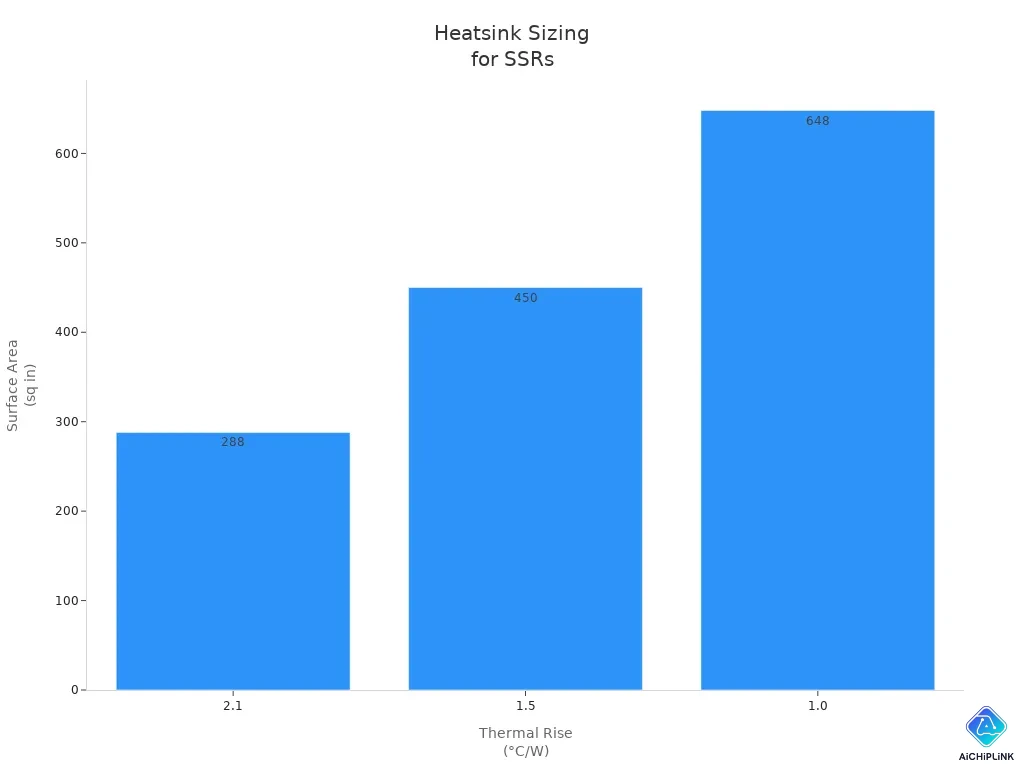
A heat sink is a metal part that helps cool your SSR. If your load is more than 4 amps, you must use a heat sink. Air alone cannot cool the SSR enough. Always put the SSR on a heat sink, not on plastic or painted things. Good airflow around the SSR helps it stay cool.
| Load Current (Amps) | Required Heat Sink | Thermal Rise (°C/W) | Surface Area (sq in) |
|---|---|---|---|
| Less than 2-4 | None | N/A | N/A |
| Greater than 4 | Yes | 2.1 | 288 |
| 1.5 | 450 | ||
| 1.0 | 648 |
The best metals for heat sinks are gold, silver, copper, and aluminum. Aluminum is the cheapest and works well for most jobs.
Tip: Do not put SSRs in closed places with no air. Always use a heat sink if your load is over 4 amps.
Derating and Ambient Temperature
You should always check how hot it is where you put your SSR. Hotter places make the SSR even hotter and can make it stop working sooner. Derating means you lower the top current when it gets hotter. This keeps the SSR safe.
-
Derating stops the SSR from getting too hot.
-
Lowering current in hot places helps the SSR last longer.
-
Staying in safe heat limits makes the SSR work better.
If you do these things, your SSR will last longer and work better in your system.
Isolation, Safety, and Protection Features
Input-Output Isolation Voltage
When you pick a solid state relay, check the input-output isolation voltage. This voltage shows how well the relay keeps the control side and load side apart. Good isolation helps protect you from electric shocks. It also stops signals from mixing. Most SSRs have isolation voltages between 2,500 and 4,000 volts. Higher isolation voltage gives better protection and helps your equipment last longer. If you use SSRs in hospitals or factories, strong isolation helps stop accidents and keeps devices working for many years.
Tip: Pick SSRs with high isolation voltage for better safety and longer life.
Certifications and Compliance
Certifications and safety standards show if your SSR follows global safety rules. Look for marks like UL, CE, and IEC. These marks mean the relay passed tough safety tests. In hospitals and other important jobs, you must follow special standards. Here is a table with two key standards for medical SSRs:
| Standard | Description |
|---|---|
| IEC 60601-1-2 | Sets rules for electromagnetic compatibility in medical equipment. |
| ISO 13485 | Focuses on quality management for medical devices to keep them safe and reliable. |
If you choose SSRs with these certifications, you get better protection for people and equipment. You also follow the legal rules for your job.
Overvoltage and Overcurrent Protection
You need to keep your SSR safe from too much voltage or current. Too much voltage can hurt the relay and make it not last as long. Too much current can make the SSR get hot and break. Many SSRs have built-in parts like snubber circuits and fuses. These parts help block power spikes and keep the relay working longer. You should use extra protection if your system has power surges or heavy loads. Good protection helps your SSR last longer and keeps your system safe.
-
Use fuses to stop too much current.
-
Add snubber circuits to block voltage spikes.
-
Check datasheets for built-in protection parts.
If you do these things, your SSR will last longer and work better. You also help your system follow safety rules.
Environmental and Mounting Considerations
Operating Temperature and Humidity
You should check the temperature and humidity where you put your SSR. If it gets too hot, the SSR can overheat and stop working early. Most SSRs work best between -30°C and 80°C. If it is hotter than this, you need to lower the current. This keeps the SSR safe. Humidity can also cause trouble. Water in the air can make metal parts rust or cause short circuits. You should keep SSRs in dry places or use boxes that keep out water.
Tip: Always look at the datasheet for the best temperature and humidity range. This helps your SSR last longer.
Vibration and Shock Resistance
Sometimes, SSRs are used in places with lots of shaking, like in cars or factories. Some SSRs, like the NOVA22 series from Sensata Technologies, are tested for strong shaking and bumps. These relays can handle up to 50g of shock and 500Hz of vibration. They meet the IEC 60068-2 standard, so they work well in tough places.
-
NOVA22 SSRs pass tests for shaking and bumps.
-
They can take up to 50g shock and 500Hz vibration.
-
They follow the IEC 60068-2 standard for reliability.
If you pick SSRs with high shock and vibration ratings, your system is safer in rough places.
Mounting Location and Footprint
How you put your SSR in place changes how easy it is to install and cool. You can use DIN rail or panel/chassis mounting. Each way has its own good points.
| Mounting Option | Benefits | Thermal Management Implications |
|---|---|---|
| DIN Rail | Flexible and easy to fix or check | Made for tough places, helps with cooling |
| Panel/Chassis Mount | Strong and safe; easy to see and reach | Lets you mount directly, which changes heat flow |
It is very important to put SSRs on heatsinks. Heatsinks help move heat away from the relay. You should put heatsinks with fins standing up. This lets air go up and cool the relay better. Good airflow stops the SSR from getting too hot and helps it work at full power.
-
Always use a heatsink for SSRs with high current.
-
Put heatsinks up and down for best air flow.
-
Make sure nothing blocks air around the SSR.
Picking the right way to mount and cool your SSR helps it work safely and last longer.
Relay Selection Guide: Common Design Parameters Checklist
Picking the right solid state relay can be hard. You want your relay to work safely and last a long time. This guide helps you check the most important design parameters. You can use it for simple lights or for motors.
Quick Reference for SSR Selection
Start with a checklist when you pick a relay. This helps you avoid mistakes and keeps things safe. The table below lists the main design parameters to check before you buy or use a relay.
| Design Parameter | Description |
|---|---|
| Load Types | Know if your load is resistive, inductive, or capacitive. This affects relay choice. |
| Rated Current | Check the maximum current the relay can handle. Pick a relay with a higher rating than your load. |
| Rated Voltage | Make sure the relay works within your system’s voltage range. |
| Peak Current | Look for relays that can handle high inrush or surge currents, especially for motors or lights. |
| Response Time | Fast response is important for some applications, like data transfer or precise timing. |
| Insulation Resistance | High insulation keeps your system safe from leakage currents. |
Tip: Always pick a relay with a current rating at least 20% higher than your load. This helps your relay last longer and work safely.
Watch out for common mistakes. Some people forget about performance or do not check the relay maker’s quality. Others skip checking technical details. These mistakes can cause equipment to break or be unsafe.
| Mistake | Description |
|---|---|
| Overlooking performance | Picking a relay just because it is cheap can be risky. |
| Ignoring manufacturer quality | Not checking if the relay maker is reliable can lead to bad choices. |
| Neglecting technical specifications | Not checking standards can cause failures and problems. |
Using this guide helps you avoid these mistakes. You make sure your relay fits your needs and works well.
Application-Specific Considerations
Every job needs a different relay. You must match the relay to your use. Heaters need relays for resistive loads. Motors need relays for inductive loads and high inrush currents. The table below shows common jobs and the load type.
| Application | Load Type |
|---|---|
| Incandescent Light Bulbs | Resistive |
| Fluorescent Light Fixtures | Inductive or Resistive* |
| Motors | Inductive |
| Transformers | Inductive |
| Heaters | Resistive |
| Computer / Electronics | Resistive |
| AC/DC power supplies (brick) | Inductive |
| AC/DC Power supplies (switcher) | Resistive |
*Old fluorescent lights use magnetic ballasts and are inductive. New ones use electronic ballasts and are resistive.
Think about safety and reliability for important jobs. Here are the top things to check:
-
Load Type: Pick a relay for AC or DC loads.
-
Current Rating: Use a relay with 20% more current for long use.
-
Control Voltage: Match the relay’s input to your control system.
-
Environmental Factors: Check IP ratings and temperature ranges.
-
Safety Features: Look for certifications like UL, CE, or IEC.
Note: For outdoor or tough places, pick relays with high IP ratings and wide temperature ranges. This keeps your system safe and working well.
You can use this guide for any job. Always check load type, current, voltage, and environment. Make sure your relay fits your system. This helps you build safer and longer-lasting systems.
When you pick a relay, you should look at the most important design parameters. These are things like input sensitivity, current rating, voltage rating, and following safety rules. You must make sure the relay matches your project so nothing breaks. Research shows that almost half of control system problems happen because people pick the wrong relay.
-
Input sensitivity is important for turning the relay on. New relays can work with very small control signals.
-
Always check safety rules like IEC 60747-5 and UL 508 to keep things safe and working well.
-
Use a simple checklist to compare different relays. There are many tools and websites to help you pick the right relay.
-
Look at datasheets and notes before you decide which relay to use.
You make your system safer and more reliable when you pick a relay that fits your needs. Picking the right relay helps your system work better and last longer.

Written by Jack Elliott from AIChipLink.
AIChipLink, one of the fastest-growing global independent electronic components distributors in the world, offers millions of products from thousands of manufacturers, and many of our in-stock parts is available to ship same day.
We mainly source and distribute integrated circuit (IC) products of brands such as Broadcom, Microchip, Texas Instruments, Infineon, NXP, Analog Devices, Qualcomm, Intel, etc., which are widely used in communication & network, telecom, industrial control, new energy and automotive electronics.
Empowered by AI, Linked to the Future. Get started on AIChipLink.com and submit your RFQ online today!
Frequently Asked Questions
What is the most important parameter when choosing an SSR?
What is the most important parameter when choosing an SSR?
Can I use an AC SSR for a DC load?
No, you should not use an AC SSR for DC loads. AC SSRs work best with AC power. DC loads need DC SSRs for safe and reliable switching.
How do I know if I need a heatsink for my SSR?
If your SSR controls more than 4 amps, you need a heatsink. A heatsink helps keep the relay cool. You can check the datasheet for heatsink requirements.
What certifications should I look for in SSRs?
Look for UL, CE, or IEC marks. These show the SSR meets safety standards. Certified SSRs help protect your system and make sure you follow rules.

